
CookShelf
CookShelfFood & Drink
3.857.00 Reviews
- Version
- 1.95.0
- Installs
- 10.00K
- Age Rating
- Everyone
Screenshots

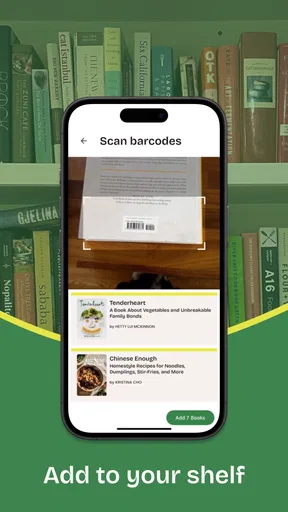

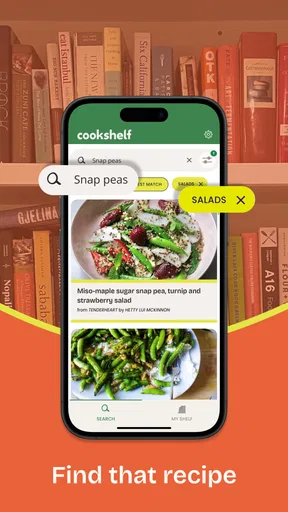
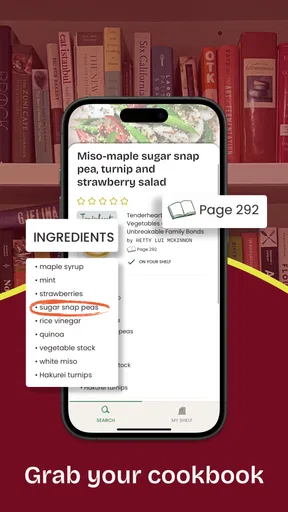

Our Review of CookShelf
 Analysis by Appyee
Choosing a recipe app depends less on how many dishes it promises and more on how you actually cook. I tend to ask a practical question first: do I need help finding ideas from ingredients I already own, or do I need a dependable place to organize recipes I have saved elsewhere? CookShelf is positioned around searching cookbooks and discovering recipes, so it makes the most sense for someone who wants their cooking references to be easier to use at home.
It is a free Food & Drink app from CookShelf, with optional in-app purchases priced from about five to forty dollars per item. Its average rating is 3.2 from around forty ratings, and it has more than ten thousand installs. That modest rating is worth keeping in mind: I would approach it as a tool to try with a specific cooking need, not assume it will suit every kitchen routine. It is rated for everyone, and version 1.34.0 runs on Android 7.0 or later.
What to look for before you make it part of your routine
For me, the key test is whether an app helps at the moment I need it: while deciding what to cook, while checking a recipe, or while planning the next grocery trip. A collection of ideas is useful only if I can search it in a way that matches how I think. Sometimes I remember a dish; other times I only remember one ingredient or the cookbook where I saw it. A tool focused on cookbook search can be especially helpful in that second situation.
I would also consider how much structure I want. If I like browsing and choosing dinner on the fly, a simple recipe-discovery app may be enough. If I cook from a personal stack of cookbooks and want to revisit what is already there, CookShelf’s central idea is more relevant. Before paying for any optional items, I’d first try a few searches that reflect my real habits: a familiar recipe, an ingredient I need to use, and a dish I only partly remember. That gives a better sense of fit than browsing at random.
Unboxing the Culinary Magic
When you first open CookShelf, the interface greets you with a clean, user-friendly design that’s as inviting as a warm bowl of soup on a chilly day. The app is all about making cooking accessible, even if your culinary skills are limited to boiling water. Navigation is a breeze, with intuitive icons and a seamless layout that even my tech-averse mom could handle.
A World of Recipes at Your Fingertips
Let’s talk about the heart of the app — the recipes. With a diverse range covering everything from quick breakfast ideas to elaborate dinner parties, CookShelf has something for everyone. Whether you’re a vegan, a meat lover, or somewhere in between, there are recipes tailored to your taste.
One feature that stands out is the ingredient-based search. Simply input what’s in your pantry, and boom — a list of possible dishes appears, making it feel like you’ve got a personal chef whispering in your ear. This has saved me countless trips to the grocery store, and I’m all for anything that helps me avoid those checkout lines.
Step-by-Step Cooking Guidance
For those of us who need a little extra hand-holding in the kitchen, the step-by-step instructions are a lifesaver. Each recipe is broken down into manageable steps, complete with photos and tips to ensure you don’t accidentally set your kitchen on fire. Plus, there are video tutorials for more complex recipes, which honestly feel like cooking classes without the hefty fee.
Dietary Needs? No Problem!
In today’s world, dietary restrictions are the norm rather than the exception. CookShelf recognizes this and offers options to filter recipes based on dietary needs. Whether you’re gluten-free, keto, or just watching your carbs, the app has you covered. It’s like having a customizable cookbook that adjusts to your lifestyle.
More Than Just Recipes
Another feature worth mentioning is the meal planner. For someone as disorganized as me, this is a godsend. You can plan your meals for the week, ensuring you’re not eating cereal for dinner again. The app even generates a shopping list based on your meal plan, which syncs with your favorite grocery delivery service. Talk about convenience!
And if you’re into tracking your culinary adventures, the journal feature allows you to document your cooking journey. Share photos, jot down notes on what worked and what didn’t, and even rate your own dishes. It’s like Instagram for your inner chef.
Making the search work in everyday cooking
The ingredient search is most useful when I treat it as a way to narrow down options, not as a promise that every dish can be made from whatever happens to be in the cupboard. A realistic weeknight example: I have vegetables that need using, a grain, and a short window before dinner. I would search around those ingredients, choose a recipe that fits my time and pantry, then check the full ingredient list before committing. That last step matters; a promising match can still call for a sauce, spice, or fresh item I do not have.
A small habit that makes recipe apps more useful is to search using the ingredient I need to use up first, rather than entering every item in the kitchen. A long list can narrow results too much or make it harder to spot a workable idea. I’d also keep a mental distinction between ingredients I can substitute and ingredients that define a dish. If a recipe depends on a particular baking ingredient or cooking method, improvising may change the result more than it would in a soup or stir-fry.
For cookbook search, the practical value is different from ordinary recipe discovery. It helps when I remember a source or a phrase but do not want to flip through several books one by one. That makes it attractive to home cooks who consult cookbooks regularly. If nearly all my recipes come from saved web pages or handwritten notes, I would first check whether the app fits that collection style instead of assuming every personal recipe source will be searchable in the same way.
Community and Sharing
A surprising yet delightful aspect of CookShelf is its community feature. You can connect with fellow foodies, share your own recipes, and get inspired by others. Whether it’s swapping tips on the best way to poach an egg or discovering a new twist on a classic dish, the community is vibrant and welcoming.
And if you’re someone who loves to show off your culinary masterpieces, you can easily share your creations on social media. Who doesn’t love a little bit of humble bragging about their homemade soufflé?
Where another kind of app may be a better fit
CookShelf’s cookbook-and-discovery focus is not automatically the best answer for every cook. Someone who wants a tightly controlled grocery workflow may prefer a dedicated shopping-list tool, especially if their main concern is coordinating a household’s purchases rather than finding meals. A person who follows a strict nutrition plan may get more value from a specialist tracker that is built around nutrient logging. Those are different jobs, and I would not choose a recipe search app expecting it to replace them.
Likewise, if I rely on a particular cooking site, a general browser bookmark system may be faster for saving and reopening those exact pages. The trade-off is that bookmarks rarely help me discover a dish from ingredients I already have. CookShelf is more compelling when I want to move from “what can I cook?” to a recipe idea, while a cookbook reader or note-taking app may suit someone who mainly wants to preserve a fixed personal collection.
Dietary filters can help narrow a search, but I would still read each recipe carefully when an allergy or medical restriction is involved. A category filter is a starting point, not a substitute for checking ingredients and preparation details. That is an important distinction for anyone cooking for guests, where cross-contact or an unexpected ingredient can matter more than convenience.
Cost, commitment, and the switch from your current method
Because the app is free to start, I’d test it with ordinary meals before deciding whether any in-app purchase is worthwhile. The purchase range runs from about five to forty dollars per item, so I would not tap through a paid option without checking what it adds and whether I would use that benefit repeatedly. A one-time burst of curiosity is a poor reason to spend; a reliable weekly habit is a better basis for judging value.
Switching from a paper cookbook shelf or a folder of saved recipes also has a real, if often overlooked, cost: the time spent changing habits. I would not try to move everything at once. Start with recipes you cook often, then use the search for one new meal each week. That approach shows whether CookShelf earns a place in your routine without turning setup into another project. If your current system already lets you find recipes quickly, there may be little reason to replace it.
Another useful test is whether a recipe remains easy to follow when you are cooking with messy hands and limited attention. Before relying on the app for a dinner with guests, I’d try one low-pressure recipe and see whether the instructions and any supporting media are practical at the counter. That rehearsal helps reveal whether the app’s presentation works for me, without risking an important meal on an unfamiliar workflow.
Final Thoughts
In a nutshell, CookShelf is more than just an app; it’s a culinary companion. Whether you’re a seasoned chef or a kitchen novice, it’s got the features to cater to your needs. With its vast recipe database, user-friendly interface, and thoughtful extras like meal planning and community interaction, it's a must-have for anyone who loves food.
So, if you’re ready to spice up your cooking routine and turn your kitchen into a gourmet paradise, give CookShelf a try. Who knows, you might just discover a hidden passion for cooking or, at the very least, impress your family with a new dish. Bon appétit!
My recommendation is more measured than “must-have”: I’d try it if cookbook searching and fresh recipe ideas are problems I actually run into, and I’d judge it by whether it saves time across several ordinary meals. The average rating of 3.2 suggests a mixed reception, so I would keep expectations practical and avoid paying before confirming that the features I use most fit my routine. For cooks who want a straightforward way to turn pantry ingredients or cookbook memories into dinner ideas, it is worth a careful test. If I mainly need nutrition tracking, collaborative shopping, or a dependable archive of recipes from many different sources, I’d compare dedicated alternatives first.
Verdict
Strengths of CookShelf
- User-friendly interface enhances navigation.
- Vast recipe collection with diverse cuisines.
- Personalized meal planning features included.
- Offline access to saved recipes available.
- Ingredient substitution suggestions are helpful.
Limitations of CookShelf
- Some recipes lack detailed instructions.
- Limited dietary preference filters available.
- Occasional app crashes during updates.
- Ads can be intrusive without premium.
- No option for community recipe sharing.
Similar Picks in This Category
View All
Rappi: Food Delivery, Grocery
Rappi, Inc - Delivery3.5

McDonald’s: Cupons e Delivery
Arcos Dorados4.3

Swiggy: Food Instamart Dineout
Swiggy4.7

Blinkit: Groceries & more
Blinkit4.8

foodpanda: food & groceries
Foodpanda GmbH a subsidiary of Delivery Hero SE4.0

Zomato: Food Delivery & Dining
Zomato4.7
Frequently Asked Questions
What is CookShelf and how does it work?
CookShelf is a comprehensive recipe management app designed for both novice cooks and seasoned chefs. It allows users to store, organize, and share their favorite recipes. The app features a user-friendly interface where you can search for recipes, create shopping lists, and even adjust serving sizes based on your needs.
Is CookShelf available on both Android and iOS?
Yes, CookShelf is available for download on both Android and iOS platforms. You can find it on the Google Play Store for Android devices and the Apple App Store for iOS devices. The app is designed to provide a seamless experience across all devices.
Does CookShelf require an internet connection to function?
While an internet connection is needed to initially download the app and access online features such as sharing recipes and syncing across devices, CookShelf also offers offline capabilities. You can view your saved recipes and shopping lists without needing to be connected to the internet.
Are there any subscription fees or in-app purchases in CookShelf?
CookShelf offers both free and premium versions. The free version includes basic features, while the premium version provides additional functionalities such as advanced meal planning and exclusive recipes. In-app purchases might include recipe packs or ad removal options, enhancing your cooking experience.
How secure is my personal data on CookShelf?
CookShelf prioritizes user privacy and data security. The app employs encryption to protect your data and offers options to back up your recipes. Additionally, the app complies with data protection regulations, ensuring that your personal information remains secure and private.
